API 数据集:接收参数
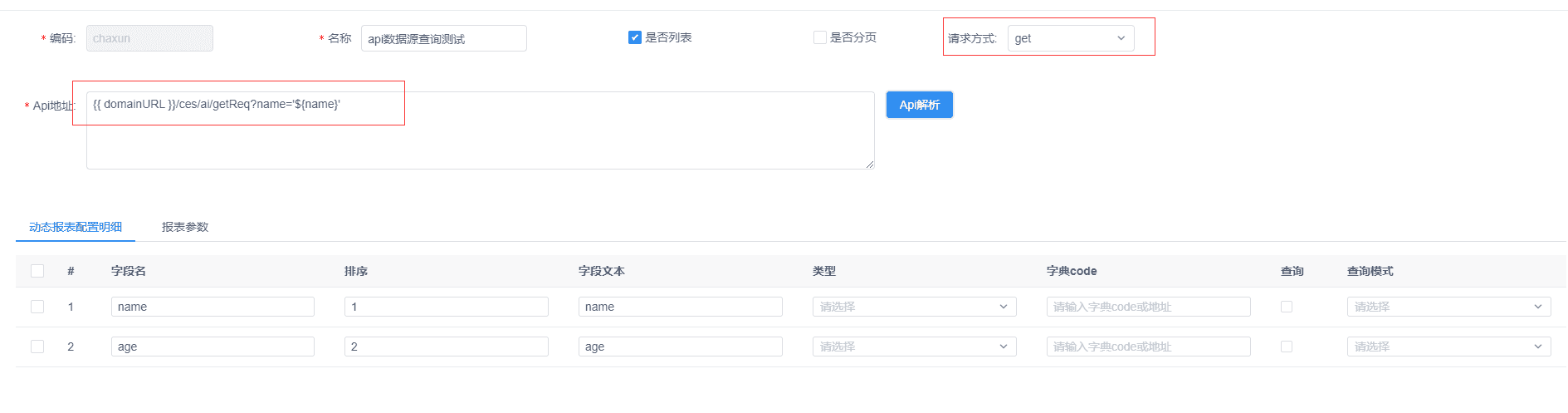
一、在请求地址中拼接参数
-
可在报表中设置参数默认值,也可在预览地址后直接拼接覆盖默认值。 示例:
http://localhost:8080/jeecg-boot/jmreport/view/12345678901?name=scott -
GET:使用
@RequestParam接收
@GetMapping("/getReq")
public JSONObject getReq(@RequestParam(name="name", required = false) String name) {}
- POST:也可用
@RequestParam接收(不推荐)
@PostMapping("/postReq")
public JSONObject postReq(@RequestParam(name="name", required = false) String name) {}
二、在数据集中配置查询条件(示例:将 name 设为查询项)

在预览页面由用户输入查询条件:

- GET:使用
@RequestParam接收
@GetMapping("/getReq")
public JSONObject getReq(@RequestParam(name="name", required = false) String name) {}
- POST:使用
@RequestBody接收(二选一)
@PostMapping("/postReq")
public JSONObject postReq(@RequestBody JSONObject json) {
    String name = json.getString("name");
}
或使用实体映射(同样需 @RequestBody):
@PostMapping("/postReq")
public JSONObject postReq(@RequestBody TestUser user) {
    String name = user.getName();
}